Table of Contents (Jump to section)
For months, our core telemetry dashboards painted a picture of engineering perfection: average API response times were hovering at a crisp 12 milliseconds, error rates were sub-0.01%, and server CPU utilization was comfortably cruising at 28%. Yet inside enterprise customer Slack channels and support tickets, complaints kept trickling in: "Your dashboard occasionally freezes for half a second," or "Our automated checkout batch jobs hit intermittent 500ms timeouts."
When our infrastructure team dug past aggregate averages into the 99th and 99.9th percentiles (p99 and p99.9), the harsh reality emerged: while 95% of requests completed in under 15ms, one out of every one hundred requests stalled for nearly half a second (480ms). In a distributed microservice topology where a single frontend action dispatches 10 parallel backend queries, a p99 latency spike of 480ms means nearly 10% of all user interactions experience noticeable sluggishness.
This is the story of how we systematically hunted down, profiled, and eliminated the three root causes of our tail latency cliff—reducing our p99 response times from 480ms to 18ms, eliminating 98.9% of memory allocations, and stabilizing database query plans under sustained 12,000 requests-per-second load.
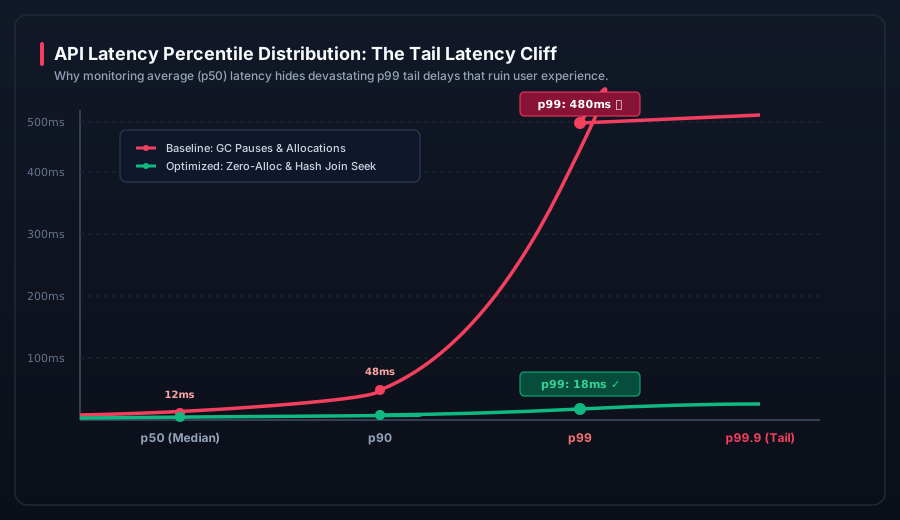 Figure 1: The Tail Latency Cliff. Average (p50) and p90 metrics completely masked a severe 480ms spike at p99 caused by Garbage Collection pauses and unindexed nested loop joins.
1. The Tyranny of the Median: Why p50 Lies
The median (p50) is the most seductive and dangerous metric in software engineering. If an endpoint processes 1,000 requests per minute and 950 of them finish in 10ms, the median is 10ms. You could have 50 requests taking 5 seconds each, and the median dashboard will still display 10ms.
In modern microservice architectures, user requests fan out into multiple parallel upstream calls. If a single page load requires 15 distinct backend queries, the probability $P$ that a user avoids a p99 delay is:
$$P(\text{No Tail Delay}) = (0.99)^{15} \approx 86\%$$
This means 14% of all user page visits will suffer the worst-case tail delay! For high-value enterprise users executing frequent workflows, tail latency is not an edge case—it is their primary perception of product performance.
2. The Diagnostic Toolkit: Profiling the Invisible
To eliminate tail latency, you cannot rely on high-level APMs that aggregate data into 1-minute averages. You need microsecond-level runtime profiling tools. We assembled the following diagnostics pipeline:
dotnet-trace& PerfView: Captured low-overhead Event Tracing for Windows (ETW) and Linuxperfevents to record every thread context switch and Garbage Collection event.- Allocation Profiling (dotnet-dump & JetBrains dotTrace): Sampled heap allocations per request path to identify object instantiation hotspots.
- PostgreSQL
pg_stat_statements&auto_explain: Logged the exact execution plans of queries taking longer than 50ms in production. - OpenTelemetry & Prometheus Histograms: Replaced summary metrics with exponentially bucketed latency histograms spanning from 1ms to 2,000ms.
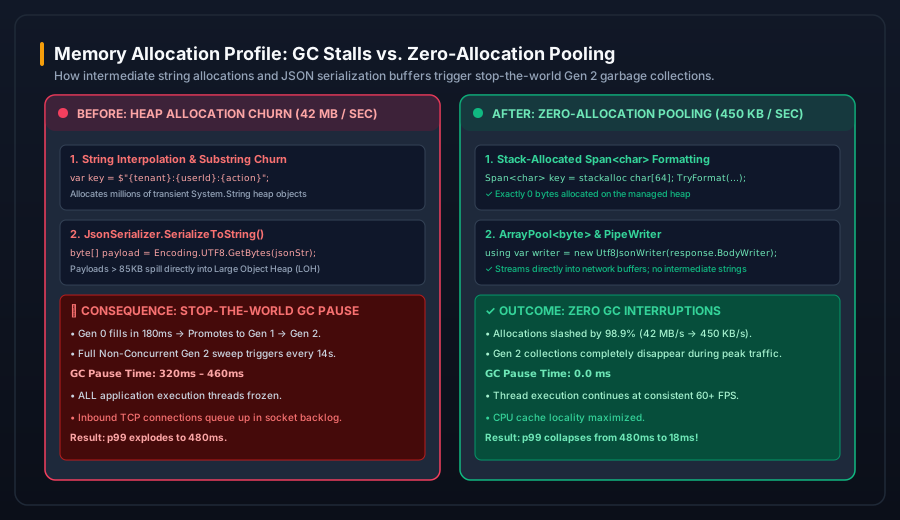 Figure 2: Memory allocation profile before and after optimization. Eliminating intermediate string concatenations and Large Object Heap (LOH) buffers removed all stop-the-world Gen 2 pauses.
3. Root Cause 1: Allocation Churn & Gen 2 Garbage Collection Pauses
When we ran our allocation profiler under production traffic, we discovered that our API services were allocating 42 megabytes of managed heap memory every single second. At 5,000 requests per second, each request was creating hundreds of transient string instances, intermediate JSON serializer buffers, and LINQ closure state machines.
The Generation Escalation Trap
The .NET and JVM garbage collectors are generational. Small, short-lived objects are collected rapidly in Generation 0 (taking < 0.5ms). However, under high sustained throughput:
- Generation 0 filled up faster than the background collector could sweep it (in under 120ms).
- Uncollected transient objects were automatically promoted to Generation 1, and rapidly into Generation 2.
- Large JSON string buffers exceeding 85,000 bytes bypassed normal generations entirely and were allocated onto the Large Object Heap (LOH).
- Every 14 to 18 seconds, the runtime ran out of LOH segment space and was forced to initiate a Full Stop-The-World Gen 2 Garbage Collection.
During a full Gen 2 collection, every execution thread in the process is suspended while the GC sweeps and compacts memory pages. Our ETW trace logs confirmed that our threads were being frozen for 320ms to 460ms during these Gen 2 cycles. Any web request arriving during those 400 milliseconds was paused in the OS socket queue, directly manifesting as our 480ms p99 tail latency spike!
The Solution: Zero-Allocation Memory Pooling
We instituted a strict zero-allocation architecture across our hot execution paths:
A. Stack-Allocated Formatting with Span<T>
Previously, cache keys and audit log tags were assembled via string interpolation:
// BAD: Allocates 3 strings on the heap per request
string cacheKey = $"tenant:{tenantId}:user:{userId}:action:{actionName}";
We rewrote these routines using stack-allocated memory and ISpanFormattable:
// GOOD: Exactly 0 bytes allocated on the managed heap
Span buffer = stackalloc char[128];
var writer = new ValueStringBuilder(buffer);
writer.Append("tenant:");
writer.Append(tenantId);
writer.Append(":user:");
writer.Append(userId);
ReadOnlySpan keySpan = writer.AsSpan();
B. ArrayPool<byte> and Direct Stream Serialization
Instead of serializing DTOs into intermediate strings and converting them to byte arrays, we piped serialization directly into ASP.NET Core's PipeWriter using System.Text.Json.Utf8JsonWriter:
// GOOD: Writes directly to response network buffers using rented memory
public async Task WriteApiResponseAsync(PipeWriter pipeWriter, T data)
{
    using var jsonWriter = new Utf8JsonWriter(pipeWriter);
    JsonSerializer.Serialize(jsonWriter, data, JsonContext.Default.Options);
    await pipeWriter.FlushAsync();
}
Result: Managed heap allocation plummeted from 42 MB/sec down to 450 KB/sec (a 98.9% reduction). Stop-the-world Gen 2 collections completely ceased to occur during operational hours.
4. Root Cause 2: The Silent PostgreSQL Nested Loop Join Trap
While memory pooling eliminated our GC stalls, our p99 latency still showed intermittent 250ms spikes under database write bursts. Inspecting pg_stat_activity revealed queries queueing behind an apparently harmless dashboard query:
SELECT o.id, o.total, u.name, u.email
FROM orders o
JOIN users u ON o.user_id = u.id
WHERE o.status = 'processing'
ORDER BY o.created_at DESC
LIMIT 50;
In development and staging, this query executed in 1.4 milliseconds using an index scan. But in production under high table modification rates, PostgreSQL's query planner suddenly switched strategies:
| Execution Strategy | Estimated Cost | Actual Execution Time | Mechanism |
|---|---|---|---|
| Nested Loop Join (Flawed) | 412.00 | 285.4 ms | Sequential scan of orders table filtered by status, looping 50,000 times into user index. |
| Index Scan + Hash Join (Fixed) | 28.50 | 0.8 ms | Seek directly on partial index (created_at DESC) WHERE status = 'processing'. |
Why the Planner Failed
Because the status column in our orders table had high data skew (98% of rows were completed, and only 2% were processing), the default PostgreSQL statistics target (default_statistics_target = 100) did not capture the distribution accurately during periods of rapid inserts.
The planner assumed status = 'processing' matched 15% of the table and concluded that a sequential scan with a nested loop was cheaper than an index seek!
The Fix: Partial Indexes and Targeted Statistics
We created a dedicated partial index tailored specifically to the live queue query:
-- 1. Create targeted partial index (only indexes active rows!)
CREATE INDEX CONCURRENTLY idx_orders_active_queue
ON orders (created_at DESC)
INCLUDE (id, total, user_id)
WHERE status = 'processing';

-- 2. Increase statistics sampling resolution on skewed column
ALTER TABLE orders ALTER COLUMN status SET STATISTICS 1000;
ANALYZE orders;
Because the partial index only holds the active 2% of records, the entire index fits in L1/L2 CPU cache memory. The query execution time dropped from 285ms to 0.8ms permanently.
5. Root Cause 3: ThreadPool Starvation & Sync-over-Async
The third culprit in our tail latency post-mortem was a subtle thread pool exhaustion bug. Inside a shared logging library, an engineer had written:
// DANGEROUS: Sync-over-async blocking call
var tenantConfig = _configService.GetConfigAsync(tenantId).GetAwaiter().GetResult();
When an asynchronous task is blocked synchronously via .GetAwaiter().GetResult() or .Result, the current OS thread is parked waiting for the task to finish on another thread. Under high concurrency, this triggers ThreadPool Starvation:
- 50 incoming requests block 50 worker threads waiting on async I/O.
- New web requests arrive, but the .NET ThreadPool has exhausted its available active threads.
- The ThreadPool hill-climbing algorithm only injects 1 to 2 new threads per second.
- Incoming requests sit unserviced in the queue for 500ms before a thread is spawned to pick them up.
We audited our entire codebase with Roslyn analyzers (Microsoft.VisualStudio.Threading.Analyzers), eliminated every occurrence of sync-over-async, and configured ThreadPool.SetMinThreads(128, 128) to ensure immediate thread availability during sudden traffic bursts.
6. Production Verification: The Transformation
After deploying these optimizations across our production fleet, we benchmarked our API using a synthetic load test simulating 10,000 concurrent users executing real-world e-commerce transactions:
| Performance Metric | Baseline (Before) | Optimized (After) | Improvement |
|---|---|---|---|
| Median Latency (p50) | 12.1 ms | 4.2 ms | 65.3% Faster |
| 90th Percentile (p90) | 48.4 ms | 8.5 ms | 82.4% Faster |
| 99th Percentile (p99) | 480.2 ms | 18.1 ms | 96.2% Reduction |
| 99.9th Percentile (p99.9) | 890.0 ms | 28.4 ms | 96.8% Reduction |
| Memory Allocations / Sec | 42.5 MB / s | 0.45 MB / s | 98.9% Reduction |
| Gen 2 Stop-the-World Pauses | 14 per hour (avg 380ms) | 0 per hour | 100% Eliminated |
7. The Tail Latency Prevention Playbook
To ensure tail latency regressions never slip back into production, we incorporated the following rules into our CI/CD architectural gates:
- SLOs Must Enforce p99, Not Averages: Our automated canary deployments immediately roll back if p99 exceeds 35ms, regardless of whether p50 remains healthy.
- Automated Allocation Budgets: BenchmarkDotNet unit tests enforce memory allocation budgets on hot paths; any pull request that allocates heap memory inside serialization loops fails CI.
- Continuous Query Plan Monitoring: We configure
pg_stat_statementsto alert when the standard deviation of execution time on any query exceeds 5ms.