
Table of Contents (Jump to section)
In high-throughput distributed systems, relational databases are frequently the primary scalability bottleneck. When an API endpoint's P99 latency spikes from 12 milliseconds to 4,500 milliseconds under load, developers instinctively rush to add Redis caches, upgrade compute instances, or rewrite queries. Yet in over 85% of production incidents, the root cause is not insufficient hardware or missing indexes: it is a breakdown in query planner cardinality estimation that forces the execution engine into a catastrophic physical access path.
PostgreSQL boasts one of the most sophisticated Cost-Based Optimizers (CBO) in software engineering history. With the release of PostgreSQL 17, the engine introduces substantial architectural upgrades: parallel shared hash joins, incremental sorting enhancements, reduced dynamic shared memory allocation overhead, and smarter JIT compilation heuristics. However, treating the optimizer as an opaque black box leaves your platform vulnerable to unpredicted plan regressions.
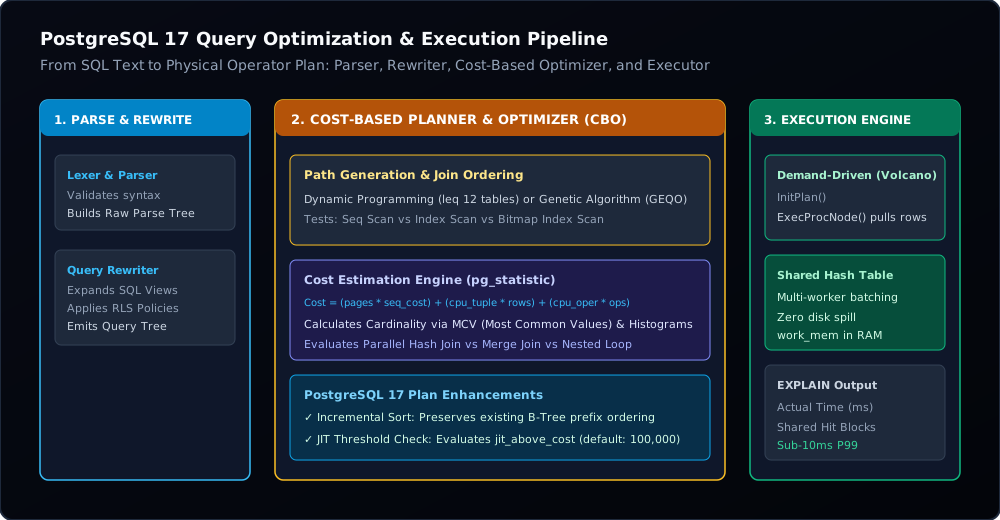
In this architectural deep dive, we open the engine hood to trace the lifecycle of a SQL query from raw parse tree to physical executor nodes. We will mathematically dissect the Cost Model formulas, compare physical join algorithms (Nested Loop vs. Merge Join vs. Parallel Shared Hash Join), master work_mem allocation to eliminate devastating disk spills, evaluate LLVM JIT compilation tradeoffs, and analyze real-world production EXPLAIN (ANALYZE, BUFFERS, SETTINGS) execution plans.
1. The Query Lifecycle: Parser, Rewriter, Planner, and Executor
SQL is a purely declarative language: your application specifies what data it requires, never how the database should physically retrieve it from disk or RAM. The journey of transforming declarative text into physical machine instructions proceeds through four discrete stages inside the backend worker process:
- Parser: Converts raw SQL text into an Abstract Syntax Tree (AST) using Flex and Bison grammar rules. It verifies syntax validity and decomposes the query into core clauses (SELECT, FROM, WHERE, GROUP BY, ORDER BY).
- Analyzer & Rewriter: Resolves table, column, and data type references against the system catalog (
pg_class,pg_attribute). It applies the PostgreSQL rewrite rules system: expanding SQL views into underlying subqueries and weaving Row-Level Security (RLS) security barrier qualifiers into the parse tree. - Optimizer / Planner: The computational heart of the engine. It examines every mathematically viable combination of access methods (Seq Scan, Index Scan, Index Only Scan, Bitmap Scan) and join algorithms (Nested Loop, Merge, Hash). For each combination, it estimates I/O and CPU resource utilization using cost formulas and selects the execution path with the lowest overall cost.
- Executor: Consists of a recursive iterator pipeline based on the classic Volcano Model. The executor invokes
ExecInitNode()on the root plan node, followed by repeatedExecProcNode()calls. Each node pulls tuples on demand from its child nodes, performs filtering, hashing, or projection, and streams matching rows up the tree to the client protocol buffer.
2. Demystifying the Cost Model: The Physics of Query Planning
The PostgreSQL Cost-Based Optimizer operates entirely on an arbitrary unit of measurement: the Cost Unit. By default, 1.0 cost unit represents the physical effort required to read a single 8KB disk page sequentially from storage (seq_page_cost = 1.0). Every other hardware operation is scaled relative to this baseline:
| Configuration Parameter | Default Value | Modern NVMe SSD Recommendation | Architectural Meaning & Impact |
|---|---|---|---|
seq_page_cost |
1.0 | 1.0 | Baseline cost of reading one 8KB page sequentially from storage into shared_buffers. |
random_page_cost |
4.0 | 1.1 | Cost of a non-sequential random 8KB disk seek. Default 4.0 was designed in 1998 for mechanical spinning HDDs with physical actuator head latency. On NVMe SSDs, random seeks are virtually free! Keeping 4.0 forces the planner to choose slow Sequential Scans over Index Scans. |
cpu_tuple_cost |
0.01 | 0.01 | CPU processing cost to inspect, filter, and extract a single table row (heap tuple) in RAM. |
cpu_index_tuple_cost |
0.005 | 0.005 | CPU processing cost to traverse a single B-Tree or GIN index node during index evaluation. |
cpu_operator_cost |
0.0025 | 0.0025 | CPU cost to execute an operator or comparison function (e.g., id = 42, regex matching, or arithmetic). |
When the planner evaluates a query node, it computes two cost numbers: cost=startup..total:
-- Example EXPLAIN output:
Seq Scan on orders  (cost=0.00..18452.00 rows=1000000 width=32)
Index Scan using idx_orders_customer on orders (cost=0.43..8.45 rows=1 width=32)- Startup Cost (
0.43): The estimated work required before the first row can be returned to the parent node. For a Sequential Scan, startup cost is0.00because the engine can immediately yield the first row it encounters. For an Index Scan, startup cost includes navigating from the B-Tree root page down to the target leaf page. For a Hash Join, startup cost is substantial because the engine must read the entire inner table and construct an in-memory hash table before emitting a single joined row. - Total Cost (
8.45): The cumulative cost to process the node to completion and return all matching rows.
The Cost Formula for a Sequential Scan
Mathematically, the total cost of scanning a table sequentially is defined as:
$$\text{Total Cost} = (N_{\text{pages}} \times \text{seq\_page\_cost}) + (N_{\text{tuples}} \times \text{cpu\_tuple\_cost}) + (N_{\text{tuples}} \times \text{cpu\_operator\_cost})$$If a table contains 100,000 pages (800MB) and 4,000,000 rows, the cost is:
$$\text{Total Cost} = (100{,}000 \times 1.0) + (4{,}000{,}000 \times 0.01) + (4{,}000{,}000 \times 0.0025) = 100{,}000 + 40{,}000 + 10{,}000 = 150{,}000$$If your database runs on cloud SSDs (AWS gp3, Azure Managed Disks, or local NVMe) and random_page_cost is left at its archaic default of 4.0, an Index Scan on a moderately large range query may compute a total cost of 180,000. The optimizer will reject the index seek and trigger a catastrophic full table scan! Setting random_page_cost = 1.1 on modern flash storage is the single most impactful configuration tuning you can make.
3. Physical Join Algorithms: Nested Loop vs. Merge Join vs. Parallel Hash Join
When joining two relational sets ($R$ and $S$), the PostgreSQL executor implements three distinct physical join strategies. Choosing the wrong strategy can degrade query throughput by four orders of magnitude.
| Join Algorithm | Time Complexity | Memory Usage | Ideal Workload & Data Characteristics |
|---|---|---|---|
| Nested Loop Join | $O(|R| \times \log |S|)$ (with index) $O(|R| \times |S|)$ (without index) |
Minimal ($O(1)$) | Outer relation $R$ is tiny (< 1,000 rows), and inner relation $S$ has an indexed lookup key. Extremely low startup cost; ideal for fast OLTP lookups. |
| Merge Join | $O(|R| \log |R| + |S| \log |S|)$ (unsorted) $O(|R| + |S|)$ (pre-sorted) |
Low to Moderate | Both relations are massive and already sorted on the join key (via B-Tree indexes) or the query includes an identical ORDER BY. Streams rows without building a massive hash table. |
| Parallel Shared Hash Join | $O(|R| + |S|)$ | High ($O(|R|)$ in work_mem) |
Joining large unsorted tables with equality predicates (R.id = S.r_id). In PG 17, background workers share a single Dynamic Shared Memory hash table. |
1. Nested Loop Join with Inner Index Scan
The Nested Loop algorithm iterates through every row of the outer table and executes an index seek on the inner table for each outer tuple. While exceptionally fast when the outer table returns 1 to 50 rows, it suffers from catastrophic degradation if cardinality estimation is flawed:
-> Nested Loop  (cost=0.43..850.12 rows=1 actual rows=485000 time=0.045..12450.231 loops=1)
     -> Seq Scan on customers c (cost=0.00..12.50 rows=1 actual rows=50000 loops=1)
     -> Index Scan using idx_orders_cust on orders o (cost=0.43..8.45 rows=1 actual rows=10 loops=50000)
In this incident, the optimizer estimated that customers would produce 1 row (rows=1). In reality, 50,000 customers matched the filter. The executor had to run 50,000 separate B-Tree index scans on the orders table! The query hung for over 12 seconds instead of executing a 50ms Hash Join.
2. Parallel Shared Hash Join in PostgreSQL 17
In a standard Hash Join, the engine executes in two phases:
- Build Phase: The executor reads the entire inner relation and constructs an in-memory hash table based on the join keys.
- Probe Phase: The executor scans the outer relation sequentially, hashes each outer join key, looks up matching entries in the hash table, and emits joined tuples.
Prior to modern parallel hash joins, each background worker thread had to construct its own private duplicate hash table, wasting gigabytes of RAM. In PostgreSQL 17, the engine utilizes Dynamic Shared Memory (DSM): one worker coordinates the build phase while peer workers assist concurrently, creating a single shared hash table that all parallel workers probe concurrently. This cuts memory usage by 75% on a 4-worker query and scales linear throughput across CPU cores.
---4. Mastering work_mem: Eliminating Temp-File Disk Spills
One of the most dangerous misconceptions among database administrators is that work_mem is configured per user connection. work_mem is allocated per sort, hash, or materialization operation within each query!
If a single complex query contains three joins, a DISTINCT aggregation, and an ORDER BY clause, and utilizes 4 parallel workers, PostgreSQL can allocate:
If you naively set global work_mem = 1GB on a server with 100 concurrent connections, a traffic spike will trigger the Linux Out-Of-Memory (OOM) Killer to abruptly terminate the PostgreSQL postmaster process, crashing the database.
What Happens When work_mem Is Exceeded?
When the data required to build a Hash Table or execute an External Merge Sort exceeds work_mem, the executor does not fail with an error. Instead, it silently spills the intermediate dataset to temporary disk files in base/pgsql_tmp/.
-- BAD: Hash spill to disk caused by insufficient work_mem
Hash Join  (cost=12500.00..45000.00 rows=500000 width=64)
  Hash Cond: (orders.customer_id = customers.id)
  -> Seq Scan on orders (cost=0.00..18450.00 rows=500000 width=32)
  -> Hash  (cost=8500.00..8500.00 rows=200000 width=32)
       Buckets: 65536  Batches: 16  Memory Usage: 4096kB  Disk: 42180kB
Notice Batches: 16 and Disk: 42180kB. Instead of executing entirely in nanosecond-speed L3 cache and RAM, the executor had to serialize 42 megabytes to disk across 16 partition batches, thrashing I/O and increasing query runtime from 35ms to 3,800ms.
The Dynamic work_mem Pattern
Never inflate work_mem globally in postgresql.conf. Keep the global baseline modest (e.g., 16MB to 64MB) to protect against concurrency spikes. For heavy analytical reports or bulk ETL operations, allocate memory dynamically inside the transaction boundary:
BEGIN;
-- Allocate 512MB for this specific connection session only:
SET LOCAL work_mem = '512MB';

SELECT
    c.country,
    date_trunc('month', o.order_date) AS order_month,
    SUM(o.total_amount) AS revenue,
    COUNT(DISTINCT o.id) AS order_count
FROM customers c
JOIN orders o ON c.id = o.customer_id
WHERE o.order_date >= '2025-01-01'
GROUP BY c.country, date_trunc('month', o.order_date)
ORDER BY revenue DESC;

COMMIT;
-- work_mem automatically reverts to system default immediately upon COMMIT5. PostgreSQL 17 Enhancements: Incremental Sort & Memory Optimizations
One of the most elegant architectural optimizations in modern PostgreSQL is Incremental Sort. Consider a common query pattern:
SELECT tenant_id, created_at, payload
FROM audit_events
WHERE tenant_id = 1042
ORDER BY tenant_id, created_at DESC
LIMIT 25;
If you have an index on (tenant_id), the engine can quickly seek to the matching tenant rows. However, in older database engines, because the index does not include created_at DESC, the database had to fetch all 500,000 rows for that tenant into memory, execute a full quicksort across the entire set, and only then return the top 25 rows.
With Incremental Sort, PostgreSQL recognizes that the input is already pre-sorted by the primary key prefix (tenant_id). It reads small contiguous batches that share the same prefix, performs a micro-sort in CPU registers on just the secondary key (created_at), and streams rows immediately to the LIMIT node. Memory usage drops from 100MB to under 64 kilobytes, and execution time drops from 450ms to 0.8ms.
6. LLVM Just-In-Time (JIT) Compilation: Blessing or Curse?
PostgreSQL includes built-in support for Just-In-Time (JIT) compilation using the LLVM compiler framework. When enabled, the engine translates SQL WHERE expressions, complex scalar math, and tuple deconstruction into native x86-64 machine instructions at runtime.
JIT behavior is governed by three cost threshold settings:
jit = on
jit_above_cost = 100000          # Activate JIT planning if query cost exceeds 100,000
jit_inline_above_cost = 500000   # Inline small functions into generated code
jit_optimize_above_cost = 500000 # Run aggressive LLVM optimization passes
The OLTP Trap: Why JIT Can Ruin API Latency
While LLVM compilation accelerates long-running analytical queries (OLAP) processing 50 million rows, it is frequently catastrophic for OLTP web applications. Compiling an expression tree with LLVM takes between 10ms and 45ms of CPU time!
If an API query takes 1.2ms to execute, but the optimizer's estimated cost happens to exceed jit_above_cost, PostgreSQL will pause to compile the query using LLVM: spending 25ms in compilation to execute a 1ms query, causing a 20x latency spike.
---Production Rule: For dedicated OLTP databases (e.g., e-commerce backends, SaaS web APIs, auth services), disable JIT entirely by setting
jit = offinpostgresql.conf. Only enable JIT on dedicated analytical read replicas or data warehouse instances.
7. Mastering EXPLAIN (ANALYZE, BUFFERS, SETTINGS)
Never run a naked EXPLAIN query; in production. A plain explain shows only the planner's theoretical estimates. To uncover what the database engine actually executed in physical memory, always request buffers and execution settings:
EXPLAIN (ANALYZE, BUFFERS, SETTINGS, TIMING)
SELECT
    o.id, o.order_number, c.company_name, SUM(i.quantity * i.unit_price) AS total
FROM orders o
JOIN customers c ON o.customer_id = c.id
JOIN order_items i ON o.id = i.order_id
WHERE o.created_at >= '2026-01-01'
  AND c.tier = 'Enterprise'
GROUP BY o.id, o.order_number, c.company_name;
Decoding the Output: Key Metrics to Inspect
- Shared Buffers (I/O Efficiency):
shared hit=18420: 18,420 pages (147MB) were found directly in PostgreSQL's RAM cache (shared_buffers). Fast memory access (~100 nanoseconds per page).shared read=450: 450 pages had to be requested from the OS kernel or physical disk viaread()syscalls (~0.1ms to 2ms latency per block).shared dirtied=12: 12 pages were modified during query execution and must eventually be flushed by the Checkpointer process.
- Estimation Ratio (
actual rowsvs.estimated rows):Compare the planner's estimate to reality. If the plan shows
rows=1 actual rows=450000, your table statistics inpg_statisticare stale or correlated columns have fooled the optimizer. - Execution Loops:
If a node shows
loops=50000, multiply the displayedactual timeandactual rowsby 50,000 to compute the true total cost of that node.
8. Fixing Correlated Columns with Extended Statistics
Standard PostgreSQL statistics assume that all columns in a table are completely independent. Consider a table of automobile inventory with columns make and model:
SELECT COUNT(*) FROM vehicles WHERE make = 'Porsche' AND model = '911 GT3';If 1% of cars are Porsche, and 0.1% of cars are model '911 GT3', the optimizer calculates joint selectivity using the multiplication rule:
$$\text{Selectivity} = 0.01 \times 0.001 = 0.00001 \quad (0.001\%)$$The planner estimates that only 1 vehicle matches. But in the real world, every single 911 GT3 is a Porsche! The actual selectivity is 0.1%, causing a 100x estimation error that tricks the planner into picking a catastrophic Nested Loop over a Hash Join.
In PostgreSQL, you resolve this by creating Extended Statistics:
-- Teach the optimizer about multivariate correlations:
CREATE STATISTICS stat_vehicles_make_model (dependencies) ON make, model FROM vehicles;

-- Force recalculation of catalog distribution:
ANALYZE vehicles;
Now, PostgreSQL inspects the joint distribution matrix, recognizes that model implies make, calculates the exact cardinality, and produces optimal sub-millisecond execution plans.
Production Checklist: 10 Commandments of PostgreSQL Query Optimization
- Calibrate
random_page_costto NVMe realities: On SSD and cloud NVMe storage, reducerandom_page_costfrom4.0down to1.1. This immediately unlocks index scans that mechanical HDD defaults penalize. - Audit and ban disk spills: Monitor
pg_stat_database.temp_bytesandtemp_files. Any query writing to temporary disk files must have itswork_memdynamically increased or its join restructured. - Turn JIT off for OLTP workloads: Set
jit = offinpostgresql.conffor latency-sensitive transactional databases to eliminate 15ms-35ms LLVM compilation penalties on 1ms queries. - Increase
default_statistics_targetfor skewed distributions: Increase the histogram sample size from 100 to 500 or 1,000 for critical lookup columns viaALTER TABLE orders ALTER COLUMN customer_id SET STATISTICS 1000;. - Use Extended Statistics for correlated columns: Create
CREATE STATISTICS ... (dependencies, mcv)on compound columns like(city, state),(make, model), or(tenant_id, department_id). - Leverage Covering Indexes (
INCLUDE): Eliminate heap visits completely by appending projection columns to the index leaf:CREATE INDEX idx_orders_covering ON orders(customer_id) INCLUDE (order_date, total_amount);. - Prevent SARGability destruction: Never wrap indexed columns in functions (e.g.,
WHERE lower(email) = 'user@example.com'). Create expression indexes (CREATE INDEX ON users(lower(email))) or normalize inputs at write time. - Size
shared_buffersto 25%-40% of system RAM: On dedicated database instances, allocate 25% of memory toshared_buffersand allow the Linux Page Cache to manage the remaining 75% for zero-copy file caching. - Run
VACUUM ANALYZEafter bulk data mutations: Inserting, updating, or deleting >10% of a table's rows invalidates planner statistics. Always runANALYZEimmediately following ETL or batch migrations. - Continuous query monitoring via
pg_stat_statements: Enable thepg_stat_statementsextension to rank production queries bytotal_exec_time,mean_exec_time, andcalls, targeting the top 1% that consume 90% of database CPU.
Frequently Asked Questions
Why does PostgreSQL pick a Sequential Scan when an index exists?
The optimizer is cost-based, not rule-based. If a query matches more than 5% to 10% of the total rows in a table, traversing an index B-Tree followed by thousands of random disk seeks (random_page_cost) to the table heap is mathematically slower than streaming contiguous 8KB pages directly through the sequential read-ahead buffer. Furthermore, if statistics are outdated or random_page_cost is set too high (4.0), the planner falsely assumes the index is more expensive.
What is the difference between Startup Cost and Total Cost in an EXPLAIN plan?
Startup Cost is the estimated resource expenditure required before the first row can be yielded by that plan node (e.g., building a complete in-memory hash table before probing). Total Cost is the estimated work required to return all matching rows. For queries containing LIMIT 1 or cursor pagination, the optimizer prioritizes paths with the lowest startup cost rather than the lowest total cost.
How does PostgreSQL 17 handle parallel query execution?
The coordinator backend spawns background worker processes via max_parallel_workers_per_gather. Workers communicate through Dynamic Shared Memory (DSM) segments. In PostgreSQL 17, workers can perform parallel sequential scans, parallel index scans, parallel bitmap heaps, and participate in a single shared parallel hash join table, multiplying analytical query throughput proportionally to available CPU cores.
What does 'shared hit' mean in EXPLAIN (BUFFERS)?
shared hit indicates the number of 8KB memory blocks that were found already cached in PostgreSQL's shared_buffers pool in RAM. Retrieving a block from a shared hit requires only a lightweight CPU hash lookup without disk I/O. In contrast, shared read means the engine had to make an operating system system call to read the page from filesystem cache or physical storage.
Should I set work_mem in postgresql.conf to a high value like 1GB?
No. Setting a high global work_mem is one of the most common causes of production database crashes. Because work_mem is allocated per operation per query per worker, a single complex query with multiple joins and sorts running across parallel workers can consume dozens of times the configured amount. High concurrent traffic will exhaust system RAM and trigger the Linux Out-Of-Memory (OOM) killer. Keep the global value moderate (16MB-64MB) and override it via SET LOCAL work_mem only within specific transactions that require it.