Table of Contents (Jump to section)
For over four decades, internet authentication has rested upon a fundamentally flawed premise: the shared secret. Whether a user memorizes an alphanumeric password, receives a 6-digit SMS one-time password (OTP), or copies a Time-based One-Time Password (TOTP) from an authenticator app, the underlying model requires transmitting confidential data across network boundaries to a remote server for verification.
This paradigm is structurally vulnerable to exploitation. Reverse-proxy phishing kits (such as Evilginx) intercept session cookies and TOTP tokens in real time; credential stuffing bots test billions of leaked database dumps against login endpoints daily; and server-side password database breaches expose millions of accounts despite high-iteration Argon2 or bcrypt hashing.
The industry's definitive answer is WebAuthn (Web Authentication, standardized by the W3C and FIDO Alliance under the FIDO2 umbrella) and its consumer deployment form: Passkeys. By replacing shared secrets with asymmetric public-key cryptography locked inside hardware secure enclaves, WebAuthn makes phishing mathematically impossible. In this comprehensive technical guide, we will examine the byte-level cryptography of WebAuthn, dissect CBOR-encoded attestation objects, extract COSE public keys, verify ECDSA assertion signatures, and build a production-grade passkey authentication engine.
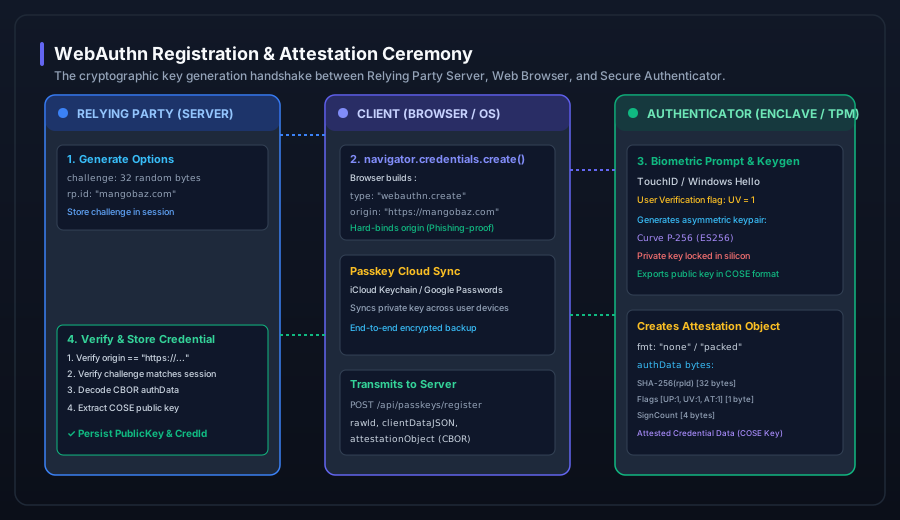 Figure 1: The WebAuthn Registration & Attestation ceremony. The Relying Party issues an unpredictable cryptographic challenge; the authenticator generates an asymmetric keypair in silicon and returns a CBOR-packed attestation statement.
1. The Cryptographic Architecture of WebAuthn
WebAuthn fundamentally reframes authentication. Instead of storing a secret on the server, the server acts as a Relying Party (RP) that stores only a public key. The corresponding private key is generated directly inside an Authenticator—such as an Apple Secure Enclave (Touch ID / Face ID), a Windows Hello TPM chip, an Android Keystore, or an external hardware security key (YubiKey).
The private key never leaves the hardware boundary. It cannot be exported, read by the operating system, or transmitted over the wire. When a user authenticates, the server presents a cryptographic challenge, and the authenticator signs that challenge using its hardware-isolated private key.
Core Actors in the FIDO2 / WebAuthn Ecosystem
- The Relying Party (RP): The web application backend (e.g.,
mangobaz.com) that initiates authentication challenges, validates cryptographic assertions, and establishes user sessions. - The Client (User Agent / Browser): The web browser (Chrome, Safari, Firefox) implementing the
navigator.credentialsJavaScript API. The browser acts as an untrusted intermediary that strictly constructs the origin context and proxies messages. - The Authenticator: The cryptographic engine that holds credentials and performs cryptographic operations. Authenticators are classified into:
- Platform Authenticators: Built into the device hardware (Touch ID, Face ID, Windows Hello).
- Roaming Authenticators: Removable hardware connected via USB, NFC, or BLE (YubiKey, Nitrokey).
2. The Registration Ceremony: Attestation and Key Generation
Registration is the cryptographic ceremony where an authenticator generates a new asymmetric keypair specifically bound to your web application's origin domain.
Step 1: The Server Generates PublicKeyCredentialCreationOptions
The server creates an options payload containing an unpredictable 32-byte cryptographic challenge, relying party metadata, user identity, and acceptable cryptographic algorithms:
{
  "challenge": "rGq9pY3qW9u_6qK5xY8zT1vB7nM4lK2jP0oI8uY6tE4",
  "rp": {
    "name": "Mangobaz IT Solutions",
    "id": "mangobaz.com"
  },
  "user": {
    "id": "dXNlcl85MDRyX2hhZGk",
    "name": "hadi@mangobaz.com",
    "displayName": "Hadi Zulfiqar"
  },
  "pubKeyCredParams": [
    { "type": "public-key", "alg": -7 },   // ES256 (ECDSA over P-256 with SHA-256)
    { "type": "public-key", "alg": -257 }, // RS256 (RSASSA-PKCS1-v1_5 with SHA-256)
    { "type": "public-key", "alg": -8 }    // EdDSA (Ed25519)
  ],
  "authenticatorSelection": {
    "residentKey": "required",            // Creates a Discoverable Credential (Passkey)
    "userVerification": "preferred"       // Biometric or PIN prompt
  },
  "timeout": 60000
}
Step 2: Browser Invokes navigator.credentials.create()
The client browser parses these options and invokes the WebAuthn API:
// Client-side registration invocation
const credential = await navigator.credentials.create({
  publicKey: creationOptions
}) as PublicKeyCredential;
Before prompting the hardware, the browser constructs the clientDataJSON structure:
{
  "type": "webauthn.create",
  "challenge": "rGq9pY3qW9u_6qK5xY8zT1vB7nM4lK2jP0oI8uY6tE4",
  "origin": "https://mangobaz.com",
  "crossOrigin": false
}
The Phishing Immunity Anchor: Notice the origin field. The browser determines this value programmatically from the current window context. A compromised web page or phishing proxy (e.g., https://mangobaz-login-fake.com) cannot forge this field. If the user is on a phishing site, the browser inserts the phishing URL into clientDataJSON, and the signature will fail server-side verification against the genuine Relying Party ID.
Step 3: Authenticator Generates Keypair and authData
The user satisfies the biometric prompt (Touch ID, Windows Hello). The authenticator generates an asymmetric keypair, binds the private key to rp.id, and returns an attestationObject encoded in CBOR (Concise Binary Object Representation, RFC 8949).
3. Deep-Dive: Decoding authenticatorData and COSE Keys
The core binary artifact generated by any FIDO2 authenticator is authenticatorData (often abbreviated as authData). It is a tightly packed byte array with a fixed structure:
| Byte Offset | Field Name | Length | Description |
|---|---|---|---|
0 .. 31 |
rpIdHash |
32 bytes | SHA-256 hash of the Relying Party ID (e.g., SHA256("mangobaz.com")). |
32 |
flags |
1 byte | Bit flags: UP (User Present, bit 0), UV (User Verified, bit 2), AT (Attested Credential Data, bit 6), ED (Extension Data, bit 7). |
33 .. 36 |
signCount |
4 bytes | Big-endian 32-bit unsigned integer counter tracking authentications. |
37 .. end |
attestedCredentialData |
Variable | AAGUID (16 bytes) + CredentialIdLength (2 bytes) + CredentialId + COSE Public Key. |
The COSE (CBOR Object Signing and Encryption) Key Format
Unlike traditional RSA or PEM keys, WebAuthn encodes public keys using RFC 8152 COSE Key structures. For a standard ES256 (NIST P-256) elliptic curve key, the CBOR map contains integer keys representing cryptographic coordinates:
// Decoded COSE Key Map (RFC 8152)
{
   1: 2,           // Key Type: 2 = EC2 (Elliptic Curve Keys)
   3: -7,          // Algorithm: -7 = ES256 (ECDSA with SHA-256)
  -1: 1,           // Curve: 1 = P-256 (secp256r1)
  -2: ,  // X Coordinate on curve
  -3:    // Y Coordinate on curve
}
The server decodes these CBOR bytes, reconstructs the public point $(X, Y)$, and converts it into standard IEEE P1363 or ASN.1 DER format for persistent database storage.
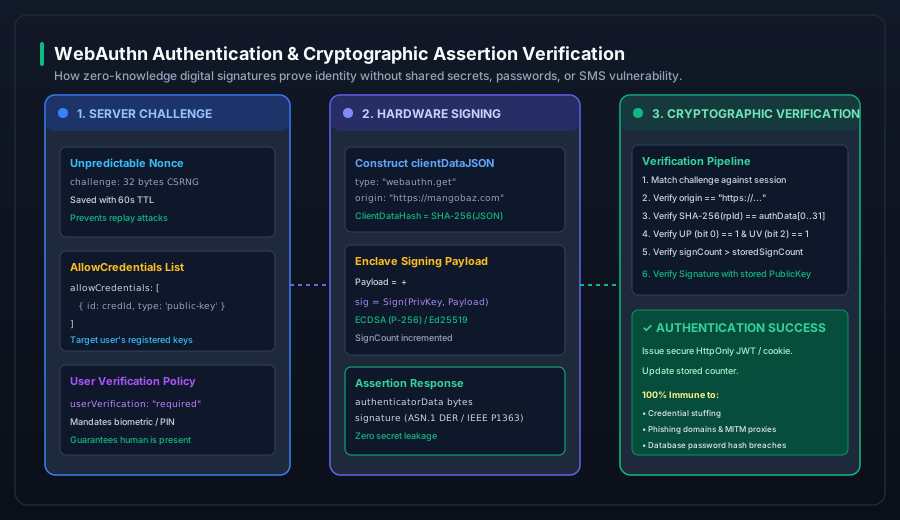 Figure 2: The WebAuthn Authentication & Assertion verification pipeline. Zero shared secrets are transmitted; the server verifies the mathematical signature computed over authData + clientDataHash.
4. The Authentication Ceremony: Assertion and Verification
When an existing user logs in, the Relying Party initiates an Assertion Ceremony.
The Cryptographic Signature Calculation
During authentication, the authenticator signs an exact concatenated binary payload using its private key:
$$\text{Payload to Sign} = \text{authenticatorData} \mathbin{\Vert} \text{SHA-256}(\text{clientDataJSON})$$
The authenticator outputs an ECDSA signature $(r, s)$ formatted in ASN.1 DER encoding. The client browser returns this signature along with the raw authenticatorData and clientDataJSON to the server.
The Server-Side Verification Pipeline
To accept the authentication, the server must execute the following non-negotiable verification sequence:
- Verify Challenge: Base64url-decode
clientDataJSON, parse the JSON, and confirm thatclientData.challengeexactly matches the challenge issued in the user's active session. - Verify Origin: Ensure
clientData.originmatches your exact expected scheme and domain (e.g.,https://mangobaz.com). If an attacker proxies the request through a malicious domain, this check instantly halts the ceremony. - Verify Relying Party ID Hash: Calculate $\text{SHA-256}(\text{"mangobaz.com"})$ and compare it against the first 32 bytes of
authenticatorData(authData[0..31]). - Verify User Presence & Verification Flags: Inspect byte 32 of
authData:- Bit 0 (
UP) must equal1(confirming physical human interaction). - Bit 2 (
UV) must equal1if your security policy mandates biometric verification.
- Bit 0 (
- Verify Signature Counter (Clone Detection): If the authenticator implements a monotonic counter, compare
authData.signCountagainst the stored counter in your database. IfsignCount <= storedSignCountandsignCount != 0, a cloned authenticator attack has occurred; reject the session immediately. - Verify Cryptographic Signature: Hash
clientDataJSONwith SHA-256, concatenateauthDatawith the hash, and verify the signature using the stored public key.
5. Production Implementation in C# / .NET
Below is a production-grade C# implementation of the assertion verification engine using .NET 8's System.Security.Cryptography.ECDsa and System.Formats.Cbor:
using System;
using System.Security.Cryptography;
using System.Text;
using System.Text.Json;

public sealed class WebAuthnAssertionVerifier
{
    private readonly string _expectedRpId;
    private readonly string _expectedOrigin;

    public WebAuthnAssertionVerifier(string expectedRpId, string expectedOrigin)
    {
        _expectedRpId = expectedRpId;
        _expectedOrigin = expectedOrigin;
    }

    public bool VerifyAssertion(
        byte[] authData,
        byte[] clientDataJson,
        byte[] signatureDer,
        byte[] expectedChallenge,
        ECParameters storedPublicKey,
        uint storedSignCount,
        out uint newSignCount)
    {
        newSignCount = 0;

        // 1. Parse and verify clientDataJSON
        using var jsonDoc = JsonDocument.Parse(clientDataJson);
        var root = jsonDoc.RootElement;

        var type = root.GetProperty("type").GetString();
        if (type != "webauthn.get") return false;

        var origin = root.GetProperty("origin").GetString();
        if (origin != _expectedOrigin) return false;

        var challengeBase64 = root.GetProperty("challenge").GetString();
        var receivedChallenge = Base64UrlDecode(challengeBase64!);
        if (!CryptographicOperations.FixedTimeEquals(receivedChallenge, expectedChallenge))
            return false;

        // 2. Verify rpIdHash in authData (Bytes 0..31)
        if (authData.Length  actualRpHash = authData.AsSpan(0, 32);
        if (!CryptographicOperations.FixedTimeEquals(actualRpHash, expectedRpHash))
            return false;

        // 3. Verify Flags (Byte 32)
        byte flags = authData[32];
        bool userPresent = (flags & 0x01) != 0;
        bool userVerified = (flags & 0x04) != 0;
        if (!userPresent) return false;

        // 4. Extract and check SignCount (Bytes 33..36, Big Endian)
        uint currentSignCount = (uint)(
            (authData[33]
6. Syncable Passkeys vs. Hardware Security Keys
The FIDO Alliance introduced Multi-Device Credentials (Passkeys) to solve consumer backup and synchronization without compromising cryptographic strength:
| Security Characteristic | Hardware Security Keys (YubiKey) | Synced Passkeys (Apple / Google / Bitwarden) |
|---|---|---|
| Private Key Portability | Device-bound (Cannot leave physical token) | End-to-End Encrypted Cloud Sync across user devices |
| Account Recovery | Requires registering secondary physical backup key | Automated via iCloud / Google Account recovery |
| Phishing Resistance | 100% Mathematical Immunity | 100% Mathematical Immunity |
| Attestation Support | Enterprise Attestation (Batch / CA verifiable) | Anonymized (Attestation format none) |
| Primary Use Case | High-value infrastructure, SREs, finance admins | B2C Consumer SaaS, high-conversion web auth |