Table of Contents (Jump to section)
For more than a decade, web performance engineering was disproportionately fixated on initial load metrics. Engineering teams invested millions of dollars optimizing First Contentful Paint (FCP), Largest Contentful Paint (LCP), and bundle sizes, celebrating when the initial splash screen rendered in under two seconds. Yet, millions of users navigating these "high-performance" single-page applications suffered through a jarring reality: clicking a navigation tab resulted in a 300ms freeze, typing into an autocomplete input dropped keystrokes, and expanding a collapsible accordion felt heavy and unresponsive.
The fundamental disconnect was that the web had evolved from static documents into complex, client-heavy software systems. In 2024, Google addressed this blind spot by officially deprecating First Input Delay (FID) and elevating Interaction to Next Paint (INP) to a Core Web Vital. In 2026, INP stands as the single most demanding and authoritative benchmark of real-world user experience and frontend code quality.
To conquer INP, frontend engineers can no longer treat the browser as a black box. You must master the physical mechanics of the browser main thread, dismantle synchronous monolithic long tasks, discard obsolete setTimeout workarounds, and embrace the modern Prioritized Task Scheduling API—most notably scheduler.yield() and scheduler.postTask(). This masterclass provides an exhaustive, production-tested roadmap to achieving sub-50ms INP across complex, enterprise-scale web applications.
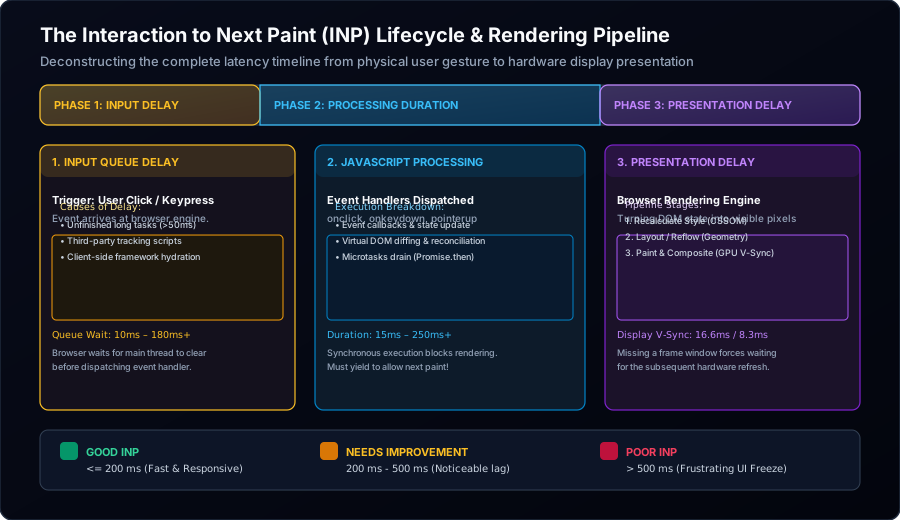
Figure 1: The complete Interaction to Next Paint (INP) lifecycle: Deconstructing the three latency phases (Input Delay, Processing Duration, and Presentation Delay) alongside the browser event loop and hardware display refresh pipeline.
1. The Core Web Vitals Evolution: Why FID Failed and INP Reigns
To understand why INP is so difficult to satisfy, we must understand the fundamental flaws of its predecessor, First Input Delay (FID).
The Fatal Blindspots of First Input Delay (FID)
FID measured only the delay between a user's very first interaction (e.g., clicking a link upon landing) and the moment the browser's main thread became free enough to begin executing the corresponding event handler. This design had three catastrophic limitations:
- It Ignored 99% of the User Session: Once the first click occurred, FID stopped measuring. An application could freeze for 800 milliseconds on every subsequent button click, modal open, or tab switch, yet still boast a "100% Good" FID score.
- It Ignored Processing Time: If the main thread picked up an event callback in 5ms, FID recorded a blazing-fast 5ms—even if the callback itself executed a synchronous 400ms JavaScript loop that froze the interface!
- It Ignored Rendering and Presentation: FID took no account of how long the browser took to recalculate styles, reflow layout geometry, and paint pixels to the display.
The Mechanics of INP: The Full Session 98th Percentile
Interaction to Next Paint (INP) radically changes the equation. It continuously measures every single user interaction—clicks, taps, and keyboard presses—throughout the entire lifetime of the page. For pages with few interactions, INP is the worst interaction observed; for pages with hundreds of interactions, INP is calculated as the 98th percentile, discarding extreme outliers while mercilessly capturing systemic sluggishness.
Crucially, INP does not just measure until JavaScript starts; it measures the total elapsed time from physical user contact until the very next visible frame is painted to the user's screen.
| INP Assessment | Duration Threshold | User Perception & Core Web Vitals Status |
|---|---|---|
| Good (Pass) | ≤ 200 ms | Immediate, fluid tactile feedback; satisfies Google ranking threshold |
| Needs Improvement | 200 ms – 500 ms | Noticeable lag; users perceive sluggishness; risks ranking penalties |
| Poor (Fail) | > 500 ms | Severe UI freeze; dropped frames; high rage-click and bounce rate |
2. The Anatomy of an Interaction: The Three Inescapable Latency Phases
Every user interaction that contributes to INP is governed by three distinct chronological phases. When your INP exceeds 200ms, your first diagnostic imperative is discovering which specific phase is consuming your latency budget.
\[\text{Total INP} = \text{Input Delay} + \text{Processing Duration} + \text{Presentation Delay}\]Phase 1: Input Delay (Queueing Latency)
Input Delay is the interval between the physical hardware event (the finger tapping the glass or the mouse button depressing) and the moment the browser's JavaScript event loop dispatches the registered event callback (onclick, onkeydown). The user's operating system delivers the interrupt instantly, but the browser main thread is single-threaded: it cannot execute the event listener if it is already busy executing another script.
The primary culprits behind high Input Delay are:
- Long Tasks (>50ms): Monolithic scripts running in the background, such as un-chunked data parsing or complex math computations.
- Third-Party Tag Managers & Analytics: Heavy marketing scripts, session recorders, and ad bidding engines hogging the thread during user engagement.
- Client-Side Framework Rehydration: Single-page applications (React, Vue, Angular) downloading giant JavaScript bundles and synchronously rehydrating the entire DOM tree when the user attempts to interact.
Phase 2: Processing Duration (JavaScript Execution)
Processing Duration is the cumulative time required to execute all synchronous JavaScript callbacks registered for that interaction. If clicking a button triggers an onClick handler that updates component state, runs an array filter over 10,000 items, and triggers virtual DOM reconciliation, the processing duration reflects the execution time of that entire call stack.
Crucially, Processing Duration also encompasses the execution of the microtask queue. In JavaScript, promises, queueMicrotask(), and framework state flushes execute immediately after the current script stack unwinds, before control returns to the browser rendering engine. An uncontrolled loop of microtasks will prolong Phase 2 indefinitely.
Phase 3: Presentation Delay (The Browser Rendering Pipeline)
Once all JavaScript callbacks have completed, the browser must convert the modified DOM state into physical light emitting from pixels on the screen. Presentation Delay encompasses the five stages of the browser rendering pipeline:
- Recalculate Style: Matching CSS selectors to DOM elements and computing final computed style values.
- Layout (Reflow): Calculating the exact geometric dimensions, bounding boxes, and coordinates of every rendered element.
- Paint (Rasterization): Recording draw calls into display lists and converting vector shapes, text, and shadows into bitmap pixels.
- Compositing: Uploading painted layers to the GPU, applying 3D transforms, opacity, and clipping.
- Hardware V-Sync Wait: Aligning the frame presentation with the physical display refresh cycle (e.g., waiting for the next 16.6ms window on a 60Hz screen or 8.3ms on a 120Hz ProMotion display).
If an interaction modifies styles that trigger full-page layout thrashing—or injects thousands of un-virtualized DOM nodes—Presentation Delay can easily exceed 250ms on its own, even if your JavaScript executed in under 10ms!
3. The Event Loop Bottleneck: Why Traditional Slicing Hacks Fail
To keep interactions responsive, frontend developers have historically attempted to "slice" large tasks into smaller increments using various asynchronous browser APIs. However, under the rigorous scrutiny of INP, legacy techniques expose fatal architectural flaws.
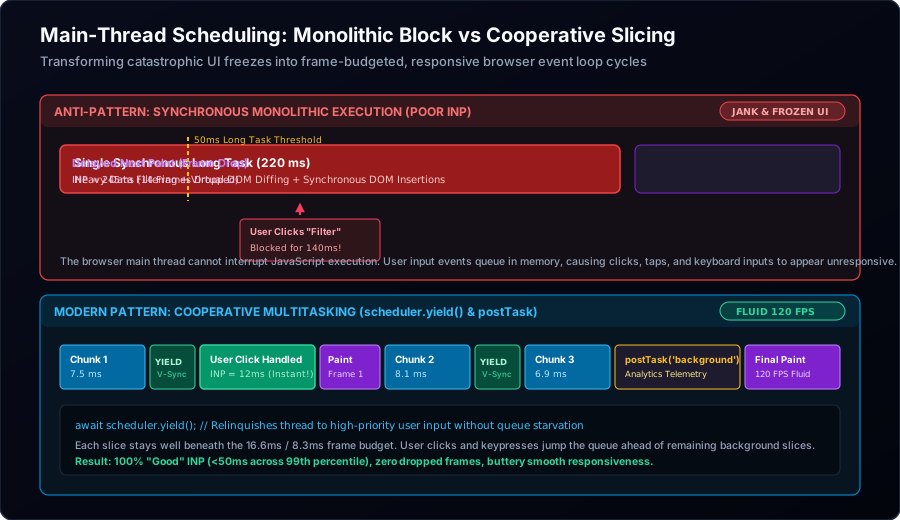
Figure 2: Comparing monolithic synchronous execution (which drops frames and creates severe INP penalties) against modern cooperative multitasking via scheduler.yield() and prioritized scheduler.postTask().
Flaw 1: The setTimeout(fn, 0) Trap
For decades, the standard recipe for breaking up a loop was wrapping iterations in setTimeout(fn, 0). While this schedules the next iteration as a separate macro-task on the event loop, it introduces two severe penalties:
- The 4ms Clamping Penalty: Per the HTML Living Standard, once a timer is nested more than five levels deep, the browser enforces a mandatory minimum clamp of 4 milliseconds. If you split a 50-step loop across
setTimeout, you inject 200ms of pure idle latency! - Queue Deprioritization:
setTimeoutappends your continuation to the very back of the task queue. If other timers, fetch callbacks, or third-party scripts are pending, they will cut in front of your work, delaying completion unpredictably.
Flaw 2: The queueMicrotask() Starvation Hazard
Many developers mistakenly attempt to yield the main thread using Promise.resolve().then(...) or queueMicrotask(). This does not yield to the browser rendering engine! Per the event loop specification:
The microtask queue must be completely drained to exhaustion before the browser can perform the "Update the Rendering" phase of the event loop.
If you break a loop using microtasks, the main thread will execute every single microtask back-to-back without ever repainting or allowing user inputs to be processed. You achieve zero reduction in INP.
Flaw 3: requestAnimationFrame (rAF) Misalignment
requestAnimationFrame is designed exclusively for smooth animations. It fires immediately before the browser executes style recalculation and layout. If you schedule heavy business logic or data transformation inside requestAnimationFrame, you directly prolong Phase 3: Presentation Delay, pushing the next paint past the frame deadline and guaranteeing dropped frames.
4. The Modern Solution: Native Cooperative Multitasking with scheduler.yield()
To solve the task slicing dilemma once and for all, the W3C Web Performance Working Group developed the Prioritized Task Scheduling API, centered around scheduler.yield().
How scheduler.yield() Works
Unlike setTimeout, scheduler.yield() is purpose-built for cooperative multitasking. When an asynchronous function calls await scheduler.yield():
- The current JavaScript task immediately relinquishes control of the main thread.
- The browser checks if any high-priority work is pending—such as a user tap, keypress, or pending display paint.
- If an interaction is pending, the browser handles the input and renders the next frame immediately.
- As soon as high-priority tasks and rendering are complete, your original task resumes at the front of the queue with its original priority intact, with zero 4ms clamping penalty!
Production-Grade scheduler.yield() Implementation with Polyfill
While scheduler.yield() is natively supported in modern Chromium browsers and standard across modern engines in 2026, enterprise applications must provide a robust, zero-overhead polyfill fallback for older runtime environments.
// =====================================================================
// PRODUCTION COOPERATIVE SCHEDULING UTILITY WITH FALLBACK
// =====================================================================

/**
 * Cooperatively yields the main thread to allow the browser to process
 * pending user interactions and render the next display frame.
 */
export async function yieldToMain(): Promise<void> {
  // 1. Native scheduler.yield (Chromium 129+ / W3C Standard 2026)
  if ('scheduler' in window && 'yield' in (window as any).scheduler) {
    return await (window as any).scheduler.yield();
  }

  // 2. High-performance fallback using MessageChannel (no 4ms clamp)
  return new Promise<void>((resolve) => {
    const channel = new MessageChannel();
    channel.port1.onmessage = () => {
      channel.port1.close();
      channel.port2.close();
      resolve();
    };
    channel.port2.postMessage(null);
  });
}

/**
 * Determines whether the current task has exceeded its allotted frame budget
 * or if a user input is actively pending in the OS queue.
 */
export function shouldYield(startTime: number, budgetMs: number = 8.0): boolean {
  // Check if browser detects pending input in queue
  if ('scheduling' in navigator && (navigator as any).scheduling?.isInputPending?.()) {
    return true;
  }
  // Check elapsed time against frame budget (default 8ms for 120Hz displays)
  return performance.now() - startTime >= budgetMs;
}
Real-World Example: Non-Blocking Table Filtering Across 50,000 Records
Consider a heavy dashboard component that must filter, sort, and calculate aggregate metrics across 50,000 rows when a user selects a filter dropdown. In a naive implementation, this blocks the main thread for 180ms, triggering a catastrophic INP failure. With cooperative slicing, the main thread yields every 8 milliseconds:
// =====================================================================
// NON-BLOCKING COOPERATIVE DATA PROCESSING
// =====================================================================
import { yieldToMain, shouldYield } from './scheduler-utils';

export interface RecordItem {
  id: string;
  category: string;
  amount: number;
  tags: string[];
}

export async function filterAndAggregateRecords(
  items: RecordItem[],
  selectedCategory: string,
  onProgress?: (percent: number) => void
): Promise<RecordItem[]> {
  const results: RecordItem[] = [];
  const total = items.length;
  let sliceStartTime = performance.now();

  for (let i = 0; i < total; i++) {
    const item = items[i];

    // Simulate computationally intensive scoring/filtering logic
    if (item.category === selectedCategory && item.amount > 0) {
      results.push(item);
    }

    // Every 500 items, check if we must yield to maintain frame budget
    if (i % 500 === 0 && shouldYield(sliceStartTime, 8.0)) {
      // Report intermediate progress to UI if requested
      if (onProgress) {
        onProgress(Math.round((i / total) * 100));
      }

      // Relinquish main thread: browser paints progress & processes any new clicks!
      await yieldToMain();

      // Reset slice stopwatch for the next chunk
      sliceStartTime = performance.now();
    }
  }

  return results;
}
5. Prioritized Task Queues with scheduler.postTask()
While scheduler.yield() handles yielding during an ongoing computation, scheduler.postTask() allows you to orchestrate when different tasks execute based on business priority.
The Three Native Priority Levels
'user-blocking': Tasks critical to immediate user input and visual feedback. Executes with highest priority. Use for typing echoes, drawer opening animations, and optimistic UI toggles.'user-visible'(Default): Tasks that the user notices, but which do not require microsecond immediacy. Use for rendering search result lists, updating charts, or loading paginated data.'background': Tasks that have zero impact on immediate user interaction. Executes only when the main thread has cleared all higher-priority work. Use for analytics beacons, telemetry logging, client-side caching, and pre-fetching next-route assets.
Dynamic Priority Inheritance and Task Cancellation
scheduler.postTask() integrates natively with TaskController (an extension of AbortController). This enables two crucial production capabilities:
- Instant Cancellation: If a user types a new character in a search box before the previous search finishes, abort the previous task immediately.
- Dynamic Priority Escalation: If a background prefetch task suddenly becomes critical because the user clicked on that section, escalate its priority from
'background'to'user-blocking'on the fly!
// =====================================================================
// ENTERPRISE AUTOCOMPLETE CONTROLLER WITH PRIORITIZED POSTTASK
// =====================================================================

export class PrioritizedSearchManager {
  private activeTaskController: TaskController | null = null;

  public async onSearchInput(query: string): Promise<void> {
    // 1. Cancel any active in-flight search task
    if (this.activeTaskController) {
      this.activeTaskController.abort();
    }

    // 2. Create a new TaskController for the current keystroke
    this.activeTaskController = new TaskController({ priority: 'user-visible' });
    const signal = this.activeTaskController.signal;

    try {
      // 3. Immediately render visual feedback on 'user-blocking' priority
      await scheduler.postTask(
        () => {
          this.renderInputSpinner(true);
        },
        { priority: 'user-blocking' }
      );

      // 4. Execute the heavy search query on 'user-visible' priority
      const results = await scheduler.postTask(
        async () => {
          return await this.executeFuzzySearch(query, signal);
        },
        { priority: 'user-visible', signal }
      );

      // 5. Render results to the DOM
      this.renderResults(results);

      // 6. Dispatch background telemetry without competing with user rendering
      scheduler.postTask(
        () => {
          this.logSearchTelemetry(query, results.length);
        },
        { priority: 'background' }
      );
    } catch (err: any) {
      if (err.name !== 'AbortError') {
        console.error('Search failed:', err);
      }
    } finally {
      this.renderInputSpinner(false);
    }
  }

  private async executeFuzzySearch(query: string, signal: AbortSignal): Promise<string[]> {
    // Check if task was aborted before doing work
    if (signal.aborted) throw new DOMException('Aborted', 'AbortError');
    // ... search logic ...
    return ['Result 1', 'Result 2'];
  }

  private renderInputSpinner(show: boolean): void { /* ... */ }
  private renderResults(results: string[]): void { /* ... */ }
  private logSearchTelemetry(query: string, count: number): void { /* ... */ }
}
6. Framework-Level INP Strategies: React 19, Vue, and Hydration
Most modern enterprise applications are built on component frameworks. Achieving top-tier INP requires aligning framework state lifecycles with browser scheduling.
React 19 Concurrent Features: startTransition
React's concurrent engine leverages the same principles underlying scheduler.postTask(). When an interaction occurs, you should divide your state updates into two categories:
- Urgent Updates: Direct input feedback (e.g., updating the text inside an input field). Handled synchronously.
- Transition Updates: Secondary rendering (e.g., filtering a list of 500 items based on that text). Wrapped in
startTransition():
// Urgent: Update input value immediately for 0ms Input Delay
setInputValue(nextValue);

// Non-urgent: Allow React to slice the render and yield to new inputs
React.startTransition(() => {
  setFilteredResults(computeResults(nextValue));
});
When a state update is wrapped in startTransition, React splits the fiber tree reconciliation into interruptible chunks. If the user presses another key while React is halfway through rendering the list, React abandons the stale render, handles the new keystroke immediately, and restarts with fresh data. This single pattern often reduces INP by over 60%.
Eliminating the Hydration Cliff with Islands Architecture
The single greatest cause of poor INP on mobile devices is monolithic JavaScript hydration. When a traditional Next.js or Nuxt application loads, it serves server-rendered HTML. To make that HTML interactive, the browser must execute megabytes of JavaScript to attach event listeners across the entire DOM tree.
If a user taps a hamburger menu while the hydration script is running, the click sits in the input queue for 300ms–800ms while the framework parses components that aren't even visible on the screen. Modern high-INP architectures solve this via Islands Architecture (Astro, Fresh):
- 90% of the page is rendered as static, zero-JavaScript HTML.
- Interactive components are isolated into independent "islands" that hydrate lazily using
client:visibleorclient:idle. - The main thread remains 95% free during initial load, driving Input Delay down to single-digit milliseconds.
7. Real-User Monitoring (RUM) & Production INP Instrumentation
Synthetic lab tests in Lighthouse run on clean, high-powered desktop machines with empty caches. To accurately diagnose INP, you must instrument Real-User Monitoring (RUM) using the browser's native PerformanceObserver API.
The following production script captures every interaction, attributes it to specific DOM elements, breaks down the three latency sub-phases, and beacons the slowest interactions to your analytics collector:
// =====================================================================
// PRODUCTION REAL-USER MONITORING (RUM) INP OBSERVER
// =====================================================================

interface INPReport {
  totalDuration: number;
  inputDelay: number;
  processingDuration: number;
  presentationDelay: number;
  interactionType: string;
  targetSelector: string;
}

export function initializeINPObserver(onReport: (report: INPReport) => void): void {
  if (!('PerformanceObserver' in window)) return;

  try {
    const observer = new PerformanceObserver((entryList) => {
      const entries = entryList.getEntries() as PerformanceEventTiming[];

      for (const entry of entries) {
        // Filter out non-interactive entries or sub-50ms noise
        if (!entry.interactionId || entry.duration < 50) continue;

        // Calculate the three chronological INP sub-phases
        const inputDelay = Math.max(0, entry.processingStart - entry.startTime);
        const processingDuration = Math.max(0, entry.processingEnd - entry.processingStart);
        const presentationDelay = Math.max(0, entry.duration - (entry.processingEnd - entry.startTime));

        // Generate CSS selector for element attribution
        const targetElement = entry.target as HTMLElement | null;
        const targetSelector = targetElement
          ? `${targetElement.tagName.toLowerCase()}${targetElement.id ? '#' + targetElement.id : ''}${targetElement.className ? '.' + targetElement.className.split(' ').join('.') : ''}`
          : 'unknown';

        const report: INPReport = {
          totalDuration: Math.round(entry.duration),
          inputDelay: Math.round(inputDelay),
          processingDuration: Math.round(processingDuration),
          presentationDelay: Math.round(presentationDelay),
          interactionType: entry.name,
          targetSelector
        };

        onReport(report);
      }
    });

    // Observe long interactions with durationThreshold buffer
    observer.observe({
      type: 'event',
      durationThreshold: 40,
      buffered: true
    } as any);
  } catch (err) {
    console.warn('PerformanceObserver for INP not supported', err);
  }
}
8. Summary Checklist: The Golden Rules of Sub-50ms INP
Achieving world-class frontend responsiveness requires discipline across the entire engineering lifecycle:
- Keep Tasks Under 16.6ms (or 8.3ms for 120Hz Displays): Treat any task exceeding 50ms as a production incident. Break long algorithms into cooperative chunks using
await yieldToMain(). - Decouple Feedback from Computation: When a user clicks a button, update the button's visual state (loading spinner, active color) synchronously in under 5ms. Defer the heavy data processing to a prioritized task.
- Never Run Microtasks in an Unbounded Loop: Remember that
queueMicrotaskandPromise.thenstarve the browser rendering engine. Usescheduler.yield()to guarantee frame presentation. - Avoid Forced Synchronous Layouts: Never read a layout geometric property (like
offsetHeightorgetBoundingClientRect()) immediately after writing to DOM styles. Batch all reads before writes. - Eliminate Monolithic Hydration: Move non-interactive components to server-side static HTML and hydrate critical UI islands lazily on interaction.
- Prioritize with TaskController: Use
scheduler.postTask()to guarantee that background telemetry, analytics, and prefetching never steal CPU cycles from active user inputs.
By shifting your frontend architecture from synchronous monolithic execution to cooperative, prioritized main-thread scheduling, you guarantee that every click, tap, and keystroke responds instantly—cementing an unbeatable, high-converting user experience across every device tier.